Technology Lab
An enterprise-grade infrastructure environment built to evaluate emerging technologies , including AI-augmented operations, infrastructure automation, and open-source alternatives to commercial platforms.
Why Build a Lab?
Most IT executives talk about emerging technology. I build with it. When my CIO asked how AI could improve IT operations, I didn’t write a whitepaper. I built a complete enterprise environment to evaluate the concept firsthand. Before recommending AI integration for a production enterprise environment, I needed to understand the failure modes, security implications, and governance requirements.
The result is a working methodology , and a clear understanding of both the potential and the limitations , that I can bring to any organization on day one.
The Numbers
5 Nodes
Hyperconverged cluster
320 GB RAM, 80 cores, 10 TB NVMe
65 Hosts
Monitored endpoints with automated alerting and 8 operational dashboards
8 API Servers
Custom integration servers with 336+ tools for unified infrastructure management
$240/yr
Total software cost replacing $75K–$109K in commercial equivalents
Case Studies
Detailed examinations of how this platform delivers measurable results:
Enterprise Infrastructure Management Platform
8 custom API integration servers, 336 tools, 48 tracked sessions measuring a 7-10x productivity improvement , the complete architecture, implementation, and measured business case for AI-augmented IT operations.
What I Built
Hyperconverged Infrastructure
A 5-node Proxmox VE cluster with live migration, shared NFS storage, and N+2 fault tolerance , demonstrating enterprise virtualization at $0 software licensing cost. 15 virtual machines run the complete operational stack. Read the full cost analysis →
API-First Operations Platform
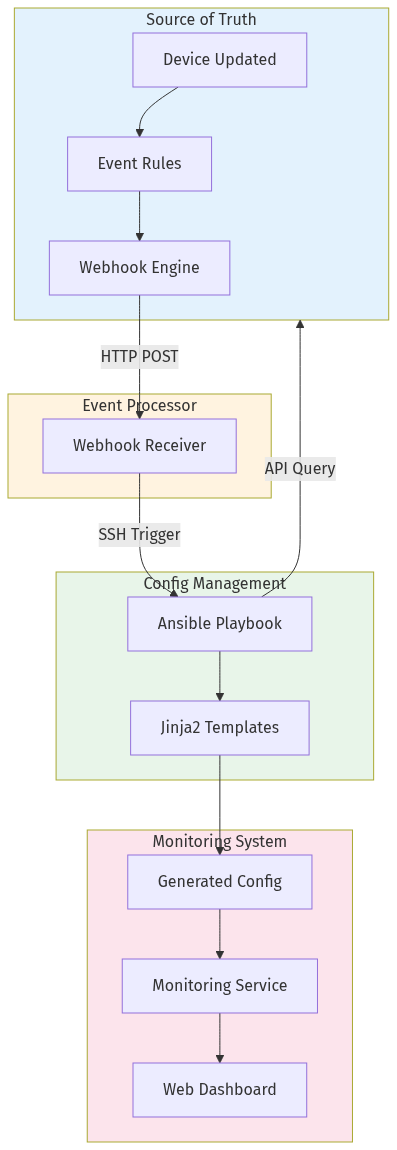
8 custom Model Context Protocol (MCP) servers providing 336+ API tools that enable unified infrastructure management through natural language. This isn’t chatbot automation , it’s a unified operations platform where AI can query NetBox for asset data, deploy configurations via Ansible, manage firewall rules in pfSense, create documentation in MediaWiki, and monitor services through Naemon , all in a single conversation. How the API architecture works →
Event-Driven Automation Pipeline
Full-Stack Observability
Naemon monitoring across 65 endpoints with automated alerting, plus Loki/Grafana centralized logging covering 13 hosts and 12 Docker containers with 8 operational dashboards and 30-day retention. The entire monitoring stack was deployed and configured using automation and infrastructure-as-code methodology. How I automated monitoring for 65 hosts → | Loki vs Splunk comparison →
Zero-Trust Security Architecture
Network Access Control with automated device quarantine, NAC policy enforcement via custom Ansible collection (4 modules, 2 roles), VLAN segmentation across 5 security zones, centralized secrets management via Vaultwarden, and pfSense firewall with granular rule management. Full NAC architecture deep dive →
Infrastructure as Code
Ansible automation managing 16 hosts with a custom UniFi Ansible Collection for network device configuration. Every configuration change is repeatable, auditable, and version-controlled.
Operational Governance
50+ documentation pages, 8 standard operating procedures, formal project tracking (24 projects, 88 tasks), device naming standards, credential migration standards, and self-maintaining documentation with automated staleness detection. What 48 tracked sessions taught me about governance →
What I’d Do Differently in Production
A lab environment is intentionally permissive. Here’s what changes in an enterprise deployment:
- Governance first: Formal change management, approval workflows, and audit trails before any AI-assisted operation touches production systems
- Restricted access scope: I wouldn’t give AI the same access in a corporate environment , and understanding why is exactly the point
- Human-in-the-loop: AI suggests, humans approve. Every destructive or state-changing operation requires explicit authorization
- Compliance alignment: SOC 2, PCI-DSS, and industry-specific frameworks integrated from day one, not bolted on after
The ROI Model
This isn’t a hobby , it’s a validated business case.
Open-Source Stack ($240/yr)
- Proxmox VE (virtualization)
- NetBox (IPAM/DCIM)
- Naemon + Loki/Grafana (monitoring)
- Ansible (automation)
- pfSense (firewall)
- Vaultwarden (secrets)
- MediaWiki (documentation)
Commercial Equivalent ($75K–$109K/yr)
- VMware vSphere
- ServiceNow CMDB
- SolarWinds + Splunk
- Red Hat Ansible Tower
- Palo Alto Networks
- CyberArk / HashiCorp
- Confluence
5-year projected net benefit: $706K at 1,117% ROI.
Deep Dives
Explore the technical details behind each component:
- The $240 Infrastructure: Open Source vs. $109K in Commercial Software
- The API-First Infrastructure: How 305 Tools Changed How I Manage a Network
- How I Automated Network Monitoring for 65 Hosts in Under a Day
- Loki vs Splunk: A Real-World Cost and Capability Comparison
- Building a Zero-Trust Network: Enterprise NAC Architecture
- What 48 Tracked Sessions Taught Me About AI in IT Operations